Terraform is an open source infrastructure as code tool created by HashiCorp. In practice, that means you describe infrastructure in files, review what will change, and then let Terraform create or update those resources through provider APIs instead of clicking around cloud consoles by hand.
For teams, the appeal is not only automation. It is repeatability, version control, reviewability, and a consistent workflow across environments.
Primary use
Provision infrastructure
Core interface
Terraform language
Main workflow
Write / plan / apply
Team benefit
Change with review
What Terraform actually does
Terraform lets you declare infrastructure resources in configuration files and then manage them over time. Those resources can be low-level cloud primitives such as VPCs, databases, and compute instances, or higher-level services like DNS records, SaaS integrations, and Kubernetes objects.
The important part is that Terraform is declarative. You describe the desired end state, and Terraform computes the steps required to move from the current state to that target.
Insight
Important distinction
Terraform is not a shell script runner with extra syntax. Its real value is the combination of declarative configuration, dependency resolution, change planning, and state-aware execution.
Why teams adopt it
When infrastructure starts to grow, manual changes become hard to trust. Terraform helps because the same configuration can be reviewed in git, promoted through environments, and reused through modules instead of reinventing the same setup over and over.
Common reasons teams adopt Terraform:
- to make cloud changes reviewable before they happen
- to standardize how environments are built
- to reduce console drift and undocumented hand edits
- to reuse patterns through modules across projects
- to provision across multiple services with one workflow
Result
Where Terraform tends to pay off fastest
Terraform is especially useful once infrastructure changes need to be repeated by more than one person, in more than one environment, on more than one service.
The core workflow
HashiCorp’s own introductory material is easy to summarize in three steps:
Quoted signal
write, plan, apply
That sequence is simple, but it changes how infrastructure work is done. Instead of pushing changes directly into a provider UI, you first define the desired resource model, then inspect the diff, then approve execution.
Workflow
01Write configuration
Workflow
02Plan the diff
Workflow
03Apply with approval
A minimal Terraform example
Below is a small example that shows the shape of a configuration. Even if the provider changes, the structure is recognizable: declare required providers, configure them, and define resources.
01terraform {02 required_version = ">= 1.6.0"03 04 required_providers {05 aws = {06 source = "hashicorp/aws"07 version = "~> 5.0"08 }09 }10}11 12provider "aws" {13 region = "eu-west-1"14}15 16resource "aws_s3_bucket" "logs" {17 bucket = "acme-platform-logs-dev"18 19 tags = {20 Environment = "dev"21 ManagedBy = "terraform"22 }23}And the CLI workflow usually looks like this:
01terraform init02terraform plan03terraform applyNote
State is part of the model
Terraform keeps track of managed resources through state. That state is operationally important and often sensitive, so teams usually move it out of a local file and into a controlled remote backend.
The pieces you should understand early
If you want to become effective with Terraform, these concepts matter more than memorizing provider syntax:
| Concept | What it does | Why it matters |
|---|---|---|
| Provider | Connects Terraform to an external platform or service API | Without a provider, Terraform cannot manage the target system |
| Resource | Represents an infrastructure object | This is the core building block of most configurations |
| Variable | Lets you parameterize configuration | Useful for environments, regions, naming, and team reuse |
| Module | Packages reusable infrastructure patterns | Helps prevent copy-paste infrastructure and drift |
| State | Records what Terraform manages | Critical for planning, reconciliation, and safe change execution |
Where Terraform is strong
Terraform is strongest when infrastructure needs to be repeatable and reviewable across environments.
Good fits include:
- landing zones and baseline cloud setup
- VPC, subnet, IAM, and networking foundations
- repeatable service infrastructure per environment
- Kubernetes clusters and supporting cloud resources
- DNS, monitoring, and third-party SaaS integrations
Warning
Common mistake
The most common bad Terraform setup is not “wrong syntax.” It is weak structure: no module boundaries, inconsistent naming, ad hoc state handling, and direct edits in production that Terraform later has to fight.
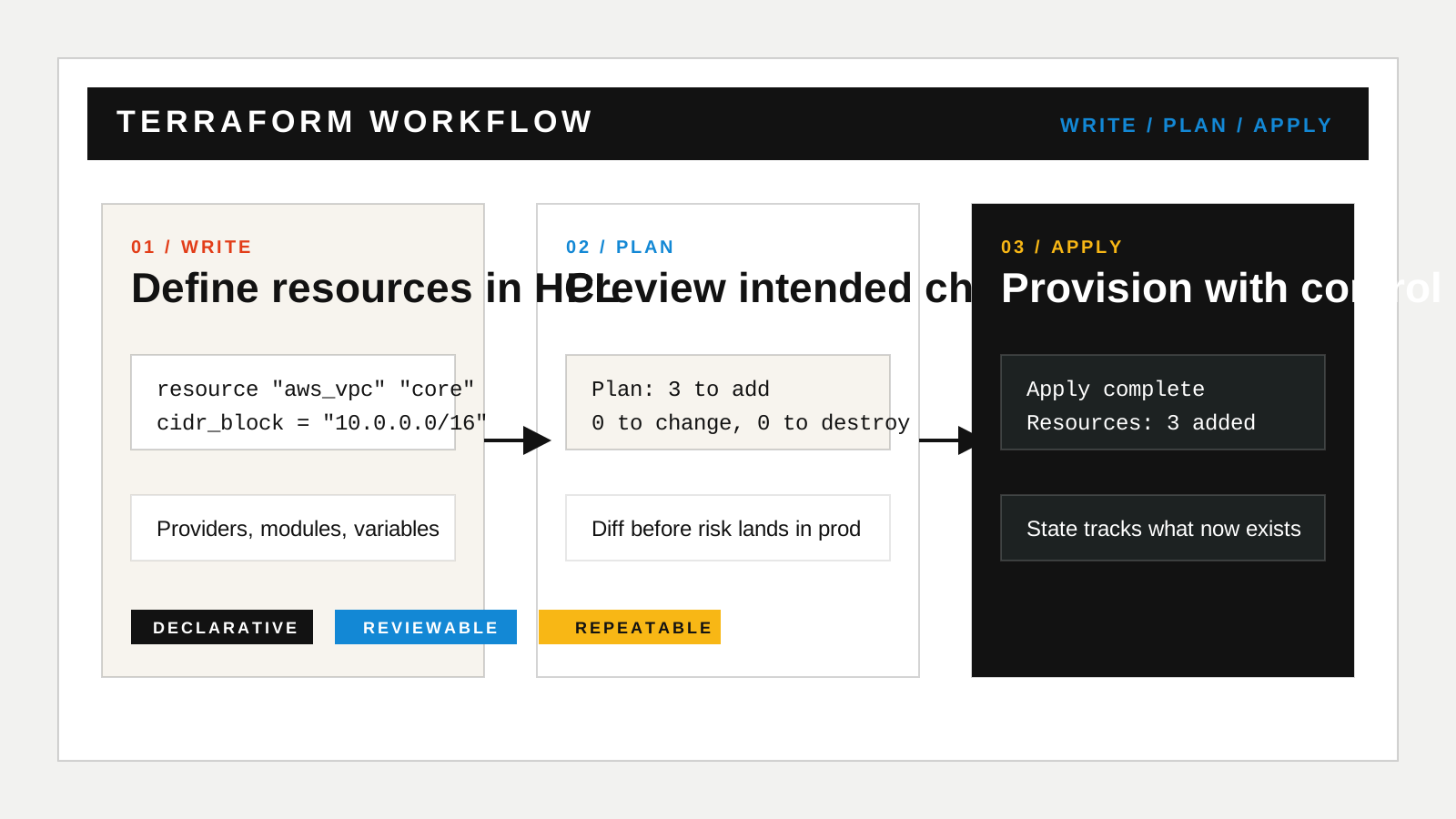
Terraform workflow illustration
The local figure below is useful as a simple mental model for article or documentation pages that explain Terraform to non-specialists.
Helpful references
If you want the official starting points, these are the most useful links:
Embedded interactive specimens
The next two blocks are intentionally here to show how richer React components behave inside MDX. They are not literal Terraform dashboards; they are examples of how you can embed interactive editorial surfaces inside an article.
MDX specimen
Provisioning pipeline surface
Use DemoFrame when you want a bordered, captioned interactive block inside an article.
Pipeline health
Inbound leads
480 / day
Qualified matches
143
Human review
29
Shipped actions
114
Operator notes
MDX specimen
Operator review surface
This is another example of embedding a client-side interactive component directly in the article body.
Flow summary
Support triage
Intent routing grouped billing, legal, and onboarding requests before handoff.
Step 01
Collect
Step 02
Reason
Step 03
Package
When Terraform is not the whole answer
Terraform is excellent at provisioning and managing infrastructure state, but it is not the full operational toolchain.
It does not replace:
- application deployment strategy
- runtime observability
- secrets management by itself
- configuration management inside every host
- human review and environment governance
That is why mature teams usually combine Terraform with CI/CD, policy checks, secret systems, and platform conventions.
A practical mental model
The cleanest way to explain Terraform to a new team is:
- describe the infrastructure you want
- review the diff against reality
- apply the change deliberately
That model is simple enough for onboarding, but still accurate enough to steer good habits.
Terraform takeaways
- Terraform is best understood as a declarative workflow for defining, reviewing, and applying infrastructure changes.
- The critical concepts are providers, resources, modules, and state rather than any single cloud vendor syntax.
- Teams usually get the most value when they pair Terraform with version control, review discipline, and a clean module structure.
If you want, the next logical article after this one would be a companion piece on Terraform state, modules, or how Terraform compares with configuration management and deployment tools. You can also browse the wider Articles archive or use the contact page if you want this kind of infrastructure workflow adapted into a real delivery setup.